

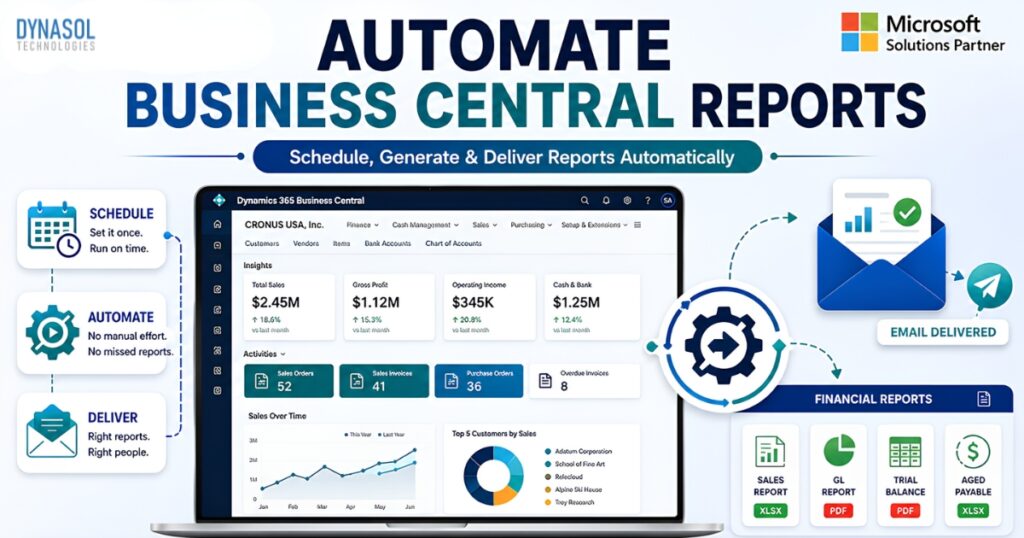
Dynasol Financial Report Dispatcher for D365 Business Central: Automate Report Delivery Without Manual Effort
Table of Contents
ToggleDynasol Financial Report Dispatcher for D365 Business Central Managing business reports shouldn’t consume valuable working hours. Yet many organizations using Microsoft Dynamics 365 Business Central still rely on manual report generation, exporting files, attaching them to emails, and sending them to managers, finance teams, auditors, or customers. As reporting requirements grow, this repetitive process becomes time-consuming and increases the risk of delays and human errors.
Dynasol Financial Report Dispatcher is designed to solve this challenge. As a powerful extension for Dynamics 365 Business Central Financial Report Dispatcher automation, it enables businesses to schedule reports, generate them automatically, and deliver them to the right recipients through email without manual intervention. Whether you need daily sales reports, weekly inventory updates, monthly financial statements, or custom operational reports, the solution ensures every report reaches the intended audience on time.
Instead of spending hours performing repetitive administrative tasks, your team can focus on analyzing business data and making informed decisions while the report distribution process runs automatically in the background. The solution supports configurable report scheduling, recipient management, dynamic filters, customizable email templates, and execution tracking, making report automation simple and reliable.
Why Businesses Need Dynasol Financial Report Dispatcher for D365 Business Central?
Many organizations generate the same reports repeatedly. Finance departments require month-end statements, sales managers monitor daily performance, warehouse teams need inventory reports, and executives expect regular business insights.
Although Business Central provides powerful reporting capabilities, manually distributing these reports every day or every week creates unnecessary workload. Employees must remember schedules, export reports, prepare emails, attach documents, and verify recipients before sending them. Over time, this process often leads to:
-
- Missed reporting deadlines
-
- Human errors in report distribution
-
- Incorrect recipients receiving reports
-
- Duplicate manual work
-
- Delayed business decisions
-
- Increased operational costs
A Dynamics 365 Business Central Financial Report Dispatcher eliminates these repetitive tasks through automation. Once configured, reports are generated according to predefined schedules and automatically delivered to designated recipients, helping businesses improve consistency, efficiency, and productivity.
What is Dynasol Financial Report Dispatcher?
Dynasol Financial Report Dispatcher is a Microsoft Dynamics 365 Business Central extension developed by Dynasol Technologies that automates report scheduling, report generation, and email delivery from within Business Central.
The extension allows administrators to configure reports once and let the system handle recurring execution automatically. Users can define report schedules, configure recipients, create reusable email templates, apply dynamic filters, and monitor execution through detailed logs. Additionally, dashboard shortcuts provide quick access to report configurations and allow users to run default reports whenever required. Unlike manual reporting processes, Dynasol Financial Report Dispatcher creates a centralized and standardized reporting workflow that improves operational efficiency while reducing administrative effort.
Key Features of Dynasol Financial Report Dispatcher
Dynasol Report Dispatcher combines multiple automation capabilities into a single Business Central extension. Some of its most valuable features include:
-
- Automated report scheduling for recurring reports
-
- Email delivery to multiple recipients
-
- Support for Financial Reports and Report Objects
-
- Dynamic report filters for date-based reporting
-
- Configurable email templates with HTML support
-
- Multiple attachment formats
-
- Dashboard integration for quick access
-
- Retry mechanism for failed email deliveries
-
- Execution logs for monitoring report history
-
- Configurable notification emails for failures
-
- Flexible recurrence rules for daily, weekly, monthly, or custom schedules
-
- Built-in licensing and administration management for easy maintenance
These features help organizations create an automated reporting environment that scales with business growth while ensuring reports are delivered accurately and consistently.
How Dynasol Financial Report Dispatcher Works
Dynasol Financial Report Dispatcher for D365 Business Central is designed to simplify report distribution through an easy-to-configure automation process. After installing the extension in Microsoft Dynamics 365 Business Central, administrators can configure reports, define recipients, create email templates, and schedule automatic deliveries.
The process begins by selecting the reports that should be automated. Users can configure either standard Business Central report objects or Financial Reports, depending on their reporting requirements. Filters can be applied to generate specific data, while dynamic filters allow reports to automatically update based on the current date or reporting period. Next, administrators assign recipients for each report. Multiple recipients can be added, and each can have its own delivery schedule, recurrence pattern, send time, and expiration date. This flexibility ensures that the right people receive the right reports exactly when they need them.
Finally, the extension uses Business Central’s Job Queue to execute scheduled tasks automatically. Reports are generated, attached in the selected format, and emailed using predefined templates. Every execution is tracked, making it easy to monitor successful deliveries and troubleshoot failures when necessary.
Benefits of Using Dynasol Financial Report Dispatcher
Automating report delivery provides more than just convenience. It creates a reliable reporting process that improves communication across the organization while reducing administrative overhead. With Dynasol Report Dispatcher, businesses can:
-
- Save hours previously spent on manual report preparation.
-
- Ensure reports are delivered consistently and on schedule.
-
- Reduce human errors caused by manual emailing.
-
- Improve collaboration by keeping stakeholders informed with up-to-date information.
-
- Configure flexible reporting schedules based on business needs.
-
- Monitor every report delivery through execution logs.
-
- Receive notifications if report delivery fails.
-
- Scale reporting operations without increasing administrative workload.
As businesses grow, reporting requirements become more complex. Automating this process allows teams to focus on analyzing business performance rather than repeatedly performing routine tasks.
Why Choose Dynasol Financial Report Dispatcher?
Many reporting tools focus only on report generation. Dynasol Financial Report Dispatcher goes a step further by providing a complete report automation solution inside Microsoft Dynamics 365 Business Central. Unlike manual reporting processes, the extension combines scheduling, recipient management, email templates, dynamic filters, dashboard integration, retry mechanisms, and execution logging into a single solution. Everything is managed within Business Central, eliminating the need for third-party automation tools or complex integrations.
Whether your organization sends daily sales reports, weekly inventory summaries, monthly financial statements, or custom operational reports, Dynasol Financial Report Dispatcher ensures every report reaches the intended audience accurately and on time. Because the solution is built specifically for Business Central users, it integrates naturally with existing business processes while maintaining a familiar user experience.
Conclusion
Timely access to business information is essential for making informed decisions. However, manually generating and distributing reports can consume valuable resources and introduce unnecessary errors.
Dynasol Financial Report Dispatcher helps organizations automate report scheduling, generation, and email delivery directly within Microsoft Dynamics 365 Business Central. From configurable report setups and dynamic filters to flexible scheduling, reusable email templates, and detailed execution logs, the extension provides everything businesses need to streamline report distribution and improve operational efficiency.
If your business relies on recurring reports to support finance, sales, operations, or management teams, Dynasol Report Dispatcher offers a reliable and scalable solution that reduces manual work, improves reporting accuracy, and ensures critical business information is delivered exactly when it’s needed.
Frequently Asked Questions (FAQs)
What is Dynasol Financial Report Dispatcher?
Dynasol Financial Report Dispatcher is a Microsoft Dynamics 365 Business Central extension that automates report scheduling, report generation, and email delivery to predefined recipients.
Can I schedule reports automatically in Business Central?
Yes. Dynasol Financial Report Dispatcher allows you to schedule reports daily, weekly, monthly, or using custom recurrence formulas, eliminating the need for manual report distribution.
Does Dynasol Financial Report Dispatcher support dynamic report filters?
Yes. The extension supports dynamic filters that automatically adjust report parameters, making it ideal for recurring financial and operational reports.
You can also learn about Vendor Remittance Advice Email Body customisation.
Can I customize the email sent with each report?
Absolutely. You can create reusable HTML email templates, customize the subject and message, configure CC/BCC recipients, and even map dynamic Business Central fields into the email content.
How can I monitor report deliveries?
Dynasol Financial Report Dispatcher maintains detailed execution logs and can notify administrators if an email delivery fails, helping ensure reliable and transparent report distribution.
Why Automate Report Distribution in Microsoft Dynamics 365 Business Central?
Every growing business depends on accurate and timely reporting. Finance teams need monthly financial statements, sales managers rely on daily sales reports, warehouse teams monitor inventory levels, and executives require performance dashboards to make informed decisions.
However, manually generating and emailing these reports every day or every month is repetitive, time-consuming, and prone to errors.
With Dynasol Financial Report Dispatcher, organizations can automate the entire report distribution process. Reports are generated on schedule, delivered to the correct recipients, and tracked through execution logs all without manual intervention. This improves operational efficiency, reduces administrative workload, and ensures stakeholders always receive the latest business information when they need it.
Who Can Benefit from Dynasol Financial Report Dispatcher?
Dynasol Report Dispatcher is designed for organizations of all sizes using Microsoft Dynamics 365 Business Central. It is especially valuable for:
-
- Finance Teams that regularly distribute Trial Balance, General Ledger, Cash Flow, and Financial Reports.
-
- Sales Managers who need daily or weekly sales performance reports.
-
- Warehouse Managers requiring inventory and stock movement reports.
-
- Business Owners and Executives who depend on scheduled KPI and management reports.
-
- Accounting Firms managing multiple Business Central clients.
-
- Manufacturing and Distribution Companies that rely on automated operational reporting.
Regardless of your industry, if your team sends recurring Business Central reports, Dynasol Report Dispatcher helps automate the process and reduce manual effort.
Why Choose Dynasol Technologies?
Dynasol Technologies specializes in developing Microsoft Dynamics 365 Business Central solutions that help businesses improve productivity, automate workflows, and streamline daily operations. Our solutions are built to integrate seamlessly with Business Central while maintaining Microsoft best practices. Every application is designed with usability, performance, and long-term reliability in mind, allowing organizations to maximize the value of their Microsoft ERP investment.
Whether you need report automation, custom Business Central extensions, system integrations, or ERP consulting, Dynasol Technologies delivers practical solutions tailored to your business requirements.
Ready to Automate Your Business Central Reports?
Stop spending valuable time generating and emailing the same reports every day.
Dynasol Financial Report Dispatcher helps you automate report scheduling, report generation, email delivery, and execution tracking all from within Microsoft Dynamics 365 Business Central.
If you’re looking for a smarter way to deliver reports, reduce manual work, and improve reporting accuracy, Dynasol Financial Report Dispatcher is the ideal solution.
Get started today and experience automated report delivery directly inside Microsoft Dynamics 365 Business Central.
