
Bring real-time costing and pricing directly into your Assembly Bills of Materials. Eliminate manual updates, outdated figures, and spreadsheets – get accurate assembly costs and margins instantly in Dynamics 365 Business Central.
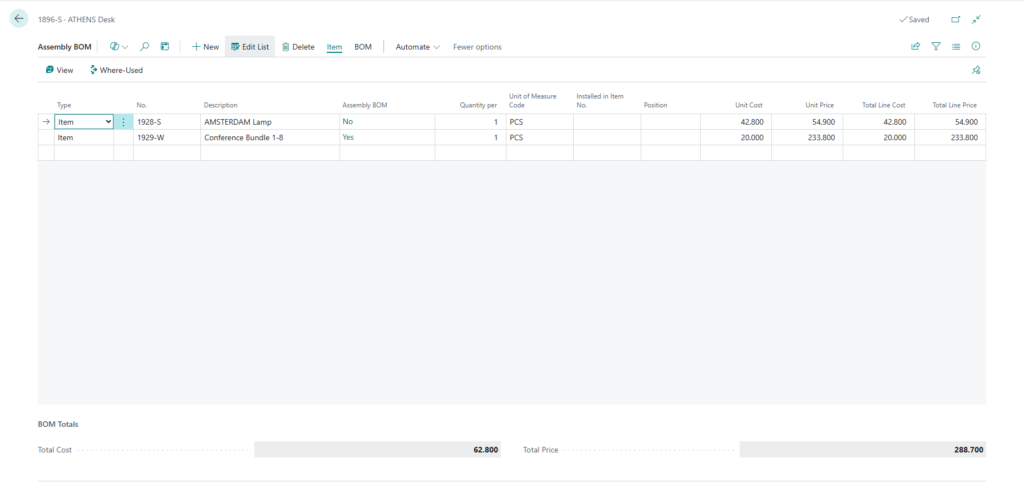
Table of Contents
ToggleWhat This Extension Does?
Dynasol Assembly BOM UoM is a lightweight extension that adds essential cost and price intelligence to your standard Assembly BOM functionality.
It automatically pulls the latest unit costs and prices from Item and Resource cards, calculates line totals, and displays full BOM summaries – all in real time.
No more manual recalculations or jumping between screens. See exact assembly costs and potential selling prices right where you work.
Why Teams Choose This Extension?
Always-current data
Unit costs and prices refresh automatically from source records.
Instant updates
Change quantity or unit of measure – line totals and grand totals recalculate immediately.
Complete visibility
View total assembly cost and total selling price at the bottom of every BOM.
Quick insights on Item Card
Estimated full BOM cost and price appear directly in the Replenishment section for assembly items.
Correct UoM handling
Smart conversion when using non-base units of measure.
Time savings
Reduce errors and hours spent on manual costing or Excel exports.
Key Features:
Enhanced Assembly BOM Lines
- Unit Cost – live from Item card
- Unit Price – live selling price from Item card
- Total Line Cost = Quantity per × Unit Cost
- Total Line Price = Quantity per × Unit Price
BOM Totals Summary
- Total Cost: Sum of all line costs across the entire BOM
- Total Price: Sum of all line prices across the entire BOM
- Includes every line (even those not visible on the current page view)
Item Card Integration
- Estimated BOM Cost and Estimated BOM Price
- Shown only for items with Assembly BOM enabled
Automatic Behavior
- Data refreshes on page load
- Updates after changes to Quantity per, Component No., or Unit of Measure Code
- Calculated values saved back to BOM lines for persistence
Seamless & Safe
- Pure AL extension – no base application changes
- Fully compatible with standard Item and BOM Component tables